Global License Exclusions
Automatically exclude licenses that you are never going to bill or sync!
There are typically a few license types in Office 365, that are either free or that you will never bill to the customer.
Our global exclusion function allows you to setup once for the licenses you always want to exclude and we will automatically take care of those billing profiles so you do not have to manually exclude them.
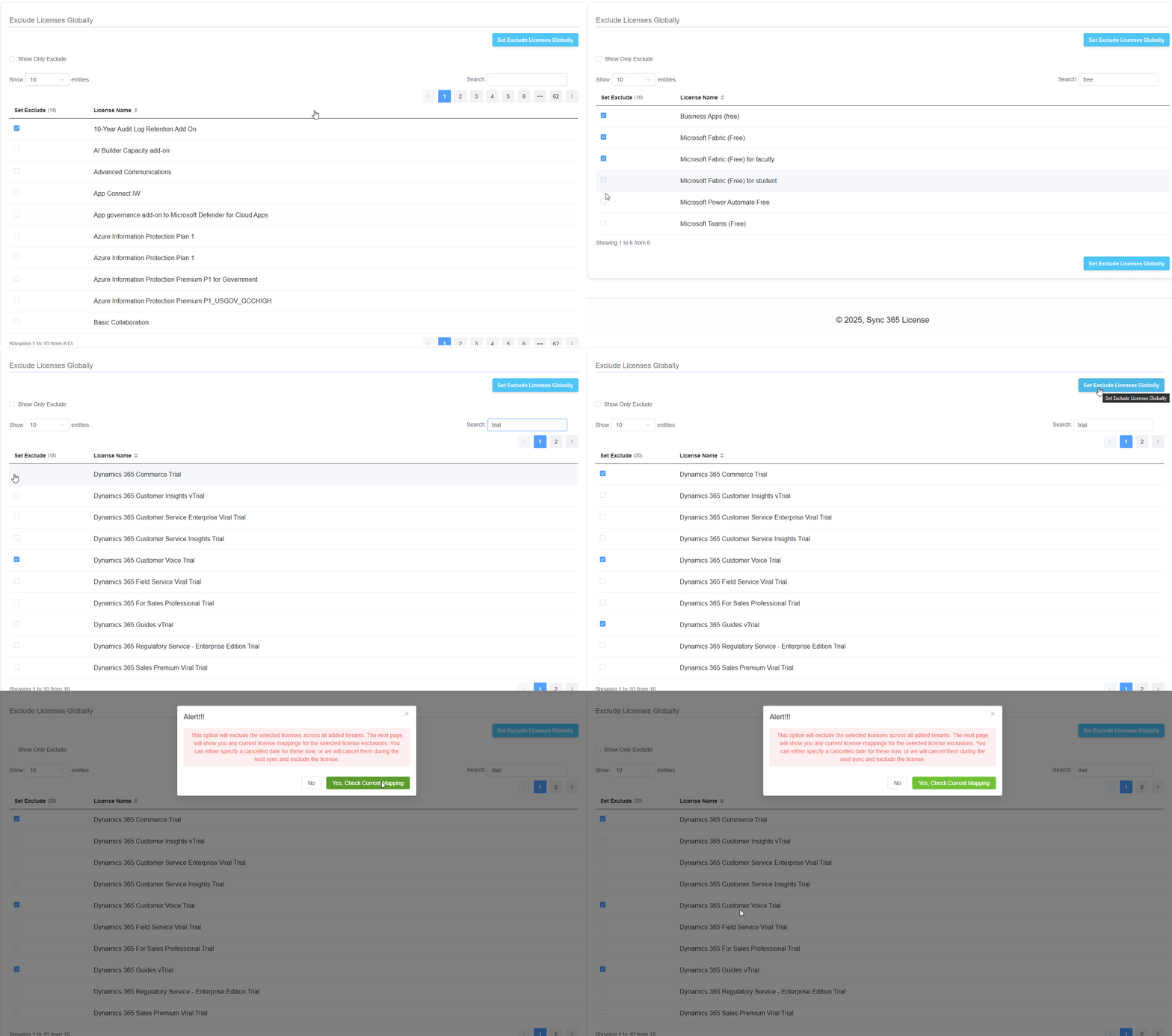
- Select the “Bulk License Options” from the Tools menu

- You will see a list of Office 365 licenses that you can exclude
- Tick the licenses you want to exclude globally and click “Set Exclude Licenses Globally”

- We will check if any of the selected licenses to exclude are active in Connectwise and give you the option to cancel them
- From now on, we will automatically exclude the selected licenses for you.
Please note, there can be a delay between new licenses appearing from Microsoft 365, and the system automatically marking it as excluded.
Related Articles
License Mapping/Configuration Options
This article explains the various options you have available when mapping a license to your PSA. We will start with the left side and then the right. Billing profile: Drop down to select a billing profile Tick to allow negative prorate: - This will ...
Granular Delegated Admin Permissions - GDAP Overview
This article explains how Granular Delegated Admin Permissions (GDAP) impact access to customer tenants and the requirements for full functionality in Sync 365. Microsoft Resources for GDAP Granular Delegated Admin Privileges (GDAP) Introduction - ...
Billing Profile Naming Best Practices
This page is to provide some best practice guidelines on how to name your billing profiles and how this comes together with Microsoft NCE. In Sync 365 we use billing profiles as a link to the product/service in your PSA. This allows us to use the ...
MS New Commerce Experience 2022
Microsoft announced some licensing changes for partners to bring them into the new commerce experience. Now available: Seat-based offers in the new commerce experience – US Partner Community Blog – Microsoft The main changes for a CSP partner here ...
Sync error log has "Addition Object Invalid" error
If you are having issues with a license syncing to your agreement and you are seeing the error "Addition Object Invalid" this is typically caused by a mismatch in the effective date. This should be a rare occurrence, but you can check your agreement ...