AADSTS530004 – Device Compliance Setting Missing
If you’ve received error AADSTS530004: AcceptCompliantDevice setting isn't configured for this organization, it means the tenant has a conditional access policy that only allows compliant devices — and the service provider account is not treated as compliant.
Cause: This typically occurs when Conditional Access policies require compliant devices, but the Sync 365 account is not covered by an exclusion.
How to Identify the Policy
- Login to the customer's Azure portal
- Open Microsoft Entra ID (Azure AD)
- Go to Users → Sign-in logs
- Select User sign-ins (non-interactive)
- Filter by application name "Sync 365 License"
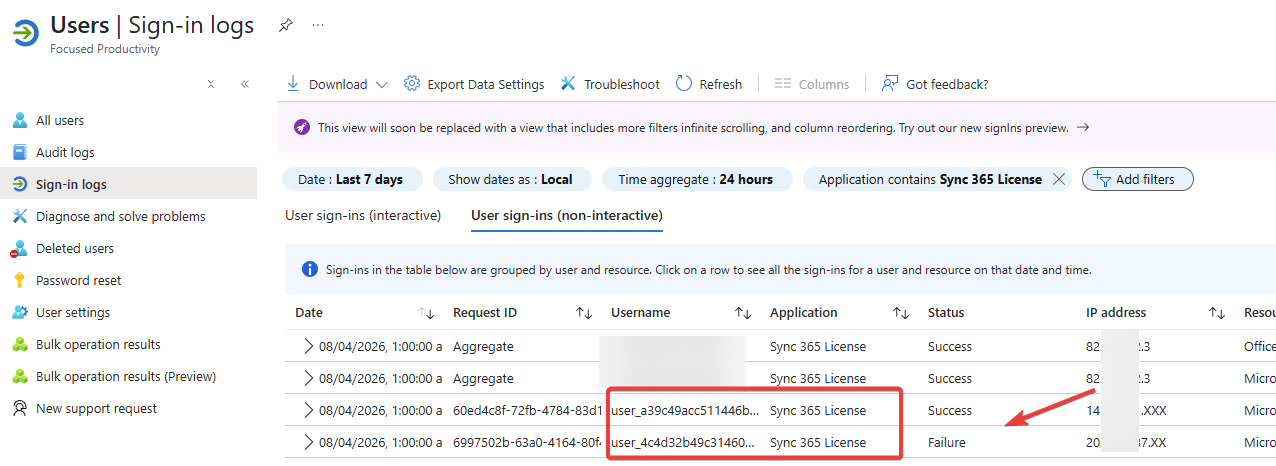
- Click into the failed sign-in
- Click Conditional Access policy to see any applied.
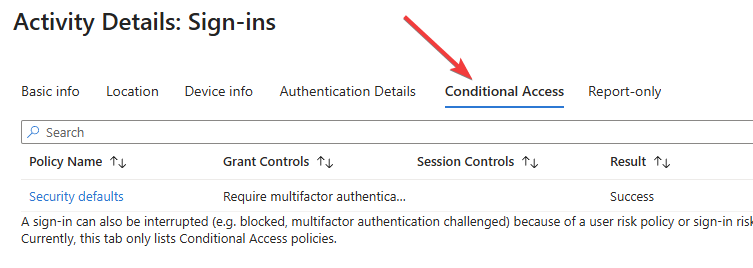
- Look for one with a Blocked Result to find the one that is blocking it.
Resolution
To resolve this issue, you can exclude the service provider account from the Conditional Access policy. See full guidance here: Conditional Access Policies
- Login to the customer’s Microsoft Entra ID portal
- Go to Conditional Access → Policies
- Identify the policy blocking access in the Sign-in logs
- Edit the policy and make the following changes:
- In the Users section, click Exclude → select "Service provider users"
- All: excludes all service providers with tenant relationships
- Select: allows you to specify specific tenant IDs — be sure to enter your tenant ID
- Save the policy and retry the connection in Sync 365
Related Articles
Missing Billing Profile alerts
Missing Billing Profile alerts A Missing Billing Profile alert means Sync 365 has found a Microsoft 365 licence, subscription row, or billing item that does not yet have a billing profile assigned. Billing profiles tell Sync 365 which PSA product, ...AADSTS135011 – Device Used During Authentication Is Disabled
Error: AADSTS135011 – The device used during authentication is disabled This error occurs when the device associated with your delegated admin account in Entra ID (Azure AD) has been disabled or deleted. Cause: Microsoft links authentication tokens ...AADSTS700003 – Device Object Not Found in Tenant
Error: AADSTS700003 – Device object was not found in the tenant This error occurs when the device originally used for delegated admin access has been deleted from your directory. Cause: If the Azure AD device associated with your delegated admin ...AADSTS53000: Device is not in required device state: compliant. Conditional Access policy requires a compliant device, and the device is not compliant. The user must enroll their device with an approved MDM provider like Intune
Error: AADSTS53000: Device is not in required device state: compliant. Conditional Access policy requires a compliant device, and the device is not compliant. The user must enroll their device with an approved MDM provider like Intune If you’ve ...Master Index Page for Troubleshooting Microsoft 365 Errors
Troubleshooting Microsoft 365 Errors If you've received an error in Sync 365 related to authentication, consent, token refresh, or license sync, use the links below to find the exact resolution. Authentication& MFA Errors AADSTS50078 – MFA expired ...